Task
Design a concise end-to-end flow and 1 key screen for an AI-powered web tool that transforms uploaded source material into engaging creative outputs. Collaboration capabilities are a must-have.
Overview
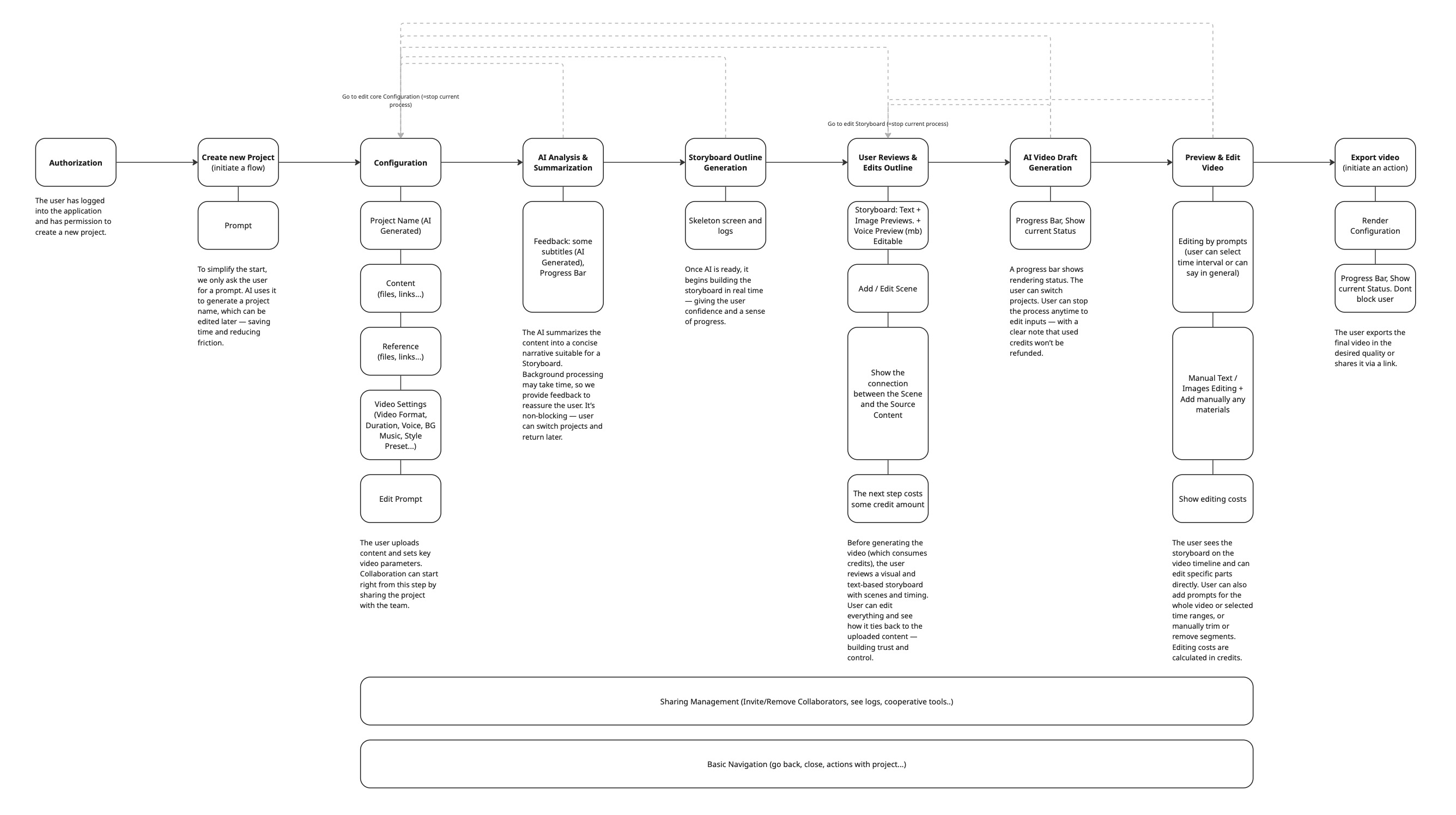
I focused on user simplicity and minimizing unnecessary steps. The interface clearly shows user progress and always provides feedback. Multiple validation checkpoints help prevent failed renders and user frustration. While collaboration features added complexity, I integrated them smoothly to maintain system stability.
Edge Cases
- Slow Processing: Skeleton screens, estimated time, background tasks, and per-scene preview as they process
- Content Misinterpretation: Outline review step; show source context so users see where summaries came from
- Inappropriate Output: Audience selection in Video Settings; language simplification tool on Storyboard step
- Low-Quality Images: AI recognizes low quality and prompts user to act
- Collaboration Conflicts: Live indicators, roles and permissions, activity logs
- Content Conflicts: Pre-validation warns if uploaded content is off-topic
- User Mistakes: Confirmation for destructive actions, undo/redo
- Unsupported Files: Input validation at upload
Validation Strategy
Multiple validation checkpoints were introduced to ensure user control and reduce the risk of wasted resources.
- Content Conflict Detection: Uploaded files are pre-validated for topic relevance. If the system detects off-topic content, the user is warned early.
- Outline Confirmation: User validates AI's understanding of the content. They can edit, reorder, or remove scenes before proceeding.
- Visual Style & Voice Preview: Users explicitly select style and narration voice before any credits are used. Previews provide immediate feedback.
- Live Storyboard Generation: Scene cards appear one by one as AI builds the storyboard — giving users confidence and the ability to stop and edit if something is wrong.